


Ever stared at a blank screen, trying to design a beautiful post for your small business in Malaysia? You drag a photo, add some text, but it just… looks messy. It can be frustrating when you know what you want to create but can’t seem to get it right. What if there was a way to learn the secrets of creating professional designs in just a few hours? Choose the best Canva course Malaysia.
This is where Canva comes in. To understand what is Canva, think of it as a digital kitchen. The ready-made templates are your recipe books, while the millions of ‘elements’—like graphics, photos, and icons—are your ingredients. It’s a free-to-start website and app designed for everyone, giving you all the tools to start creating without any design experience.
In practice, this means a home-based kuih business can create a stunning Instagram post in minutes. A student can design a professional-looking resume for their first job, or a local boutique can make a digital flyer for a festive sale. Thousands of Malaysians already use it because the foundation for great design is built right in, making it accessible and relevant.
But just like having a fancy kitchen doesn’t automatically make you a great chef, having Canva doesn’t guarantee polished results. A dedicated Canva online course can teach you the essential techniques to go from feeling frustrated to feeling proud of your work, and this guide will show you how to find the right Canva course Malaysia for you.
Free Tutorials vs. a Structured Course: What’s the Real Difference?
It’s true—you can find countless free Canva tutorials online. Many Malaysians start by watching a few videos to learn Canva, picking up a trick here and there. But have you ever spent an hour watching tutorials, only to find your own design still doesn’t look quite right? This highlights the key difference between knowing what buttons to press and understanding why a design works.
Learning on your own often means you’re collecting random puzzle pieces without knowing how they fit together. You might learn how to add text, but not how to choose fonts and colours that look professional. You might discover how to add a photo, but not the secrets to making your most important message stand out. This is where structured Canva training changes everything.
Think of it like navigating a new city. Which is more effective?
- Self-Learning: This is like asking random strangers for directions. You might get there eventually, but you’ll take a lot of wrong turns and waste valuable time.
- A Structured Course: This is like using Waze. It gives you a clear, efficient roadmap from where you are (a beginner) to where you want to go (creating professional designs with confidence).
Ultimately, a course is a shortcut. It’s designed to teach you the most important skills in a logical order, building your confidence step-by-step. Instead of wasting hours searching for answers, you learn a complete system for creating great visuals quickly, so you can get back to focusing on your business, project, or studies.
What is Actually Taught in a Canva Workshop? The 3 Core Skills You’ll Master
So, you know a course provides a roadmap, but what are the actual destinations? You might think a Canva design course is just a tour of buttons and menus. The reality is far more valuable. A quality workshop focuses less on just using templates and more on giving you the creative confidence to make anything look good, even from a blank page.
Instead of just showing you features, a great course teaches you a complete system. Most training in Malaysia builds on three core Canva skills for content creators:
- The Rules for Looking Pro: Simple design secrets (like colour pairing and text placement) that instantly make your work look polished and professional.
- The Secrets to Speed: Learning time-saving workflows, so you’re not starting from scratch every time.
- The Eye for Quality: How to find and combine the best photos, graphics, and fonts from Canva’s massive library to avoid a cheap or cluttered look.
Mastering the “secrets to speed” is a game-changer. For example, a course will teach you how to set up your Brand Kit. This is a special feature where you save your business logo, brand colours, and fonts in one place. With this set up, you can apply your unique brand style to any template in a single click, ensuring everything you create looks consistently professional.
These are the skills that separate amateurs from proficient creators. It’s not just about knowing where the ‘download’ button is; it’s about understanding the simple rules that transform a basic poster into something that truly captures attention.
Before & After: How Basic Design Rules Can Transform a Simple Malaysian Poster
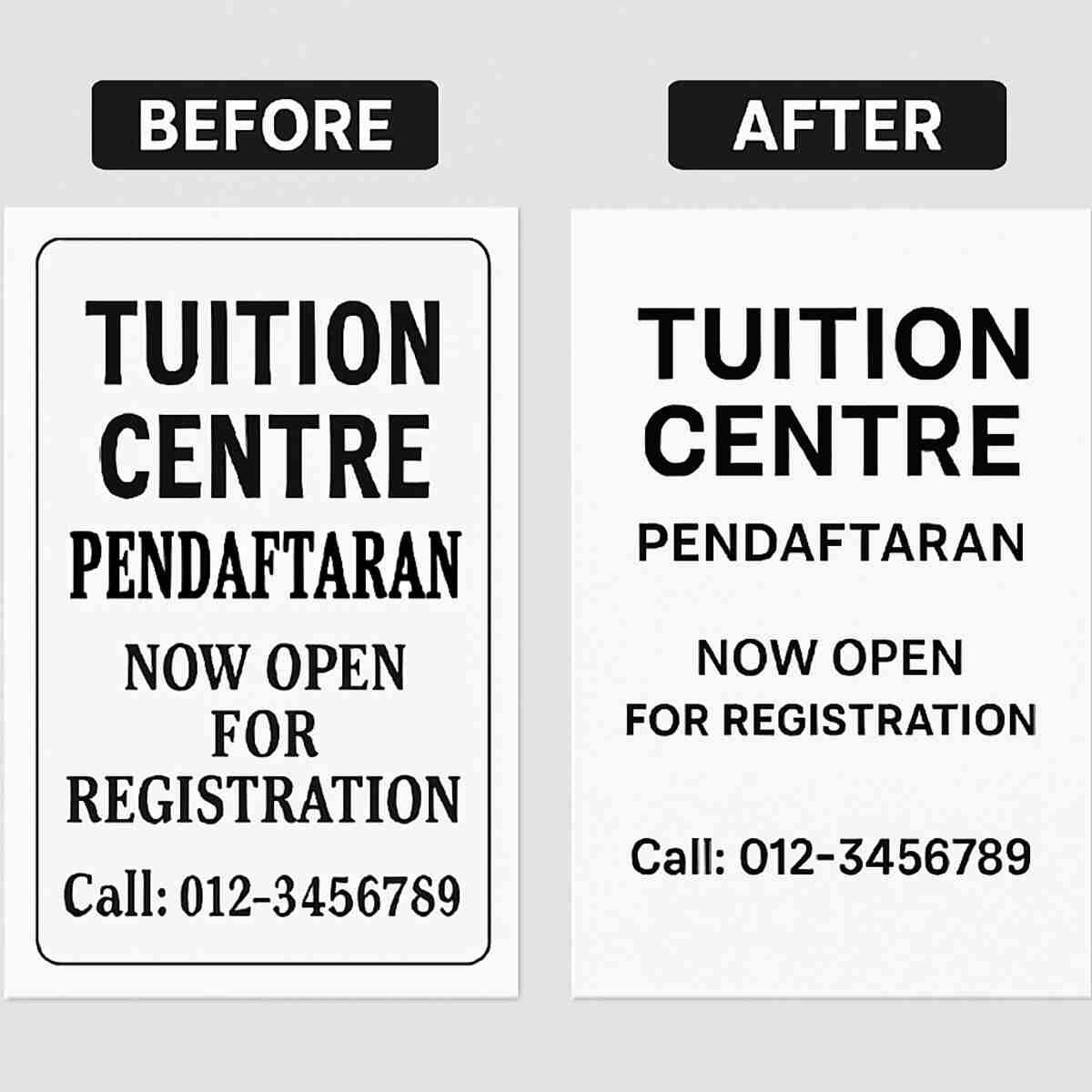
When you create a poster where all the information is correct, but it just looks… messy, it can be disappointing. Take a look at the “before” image on the left. It’s a simple registration poster for a tuition centre, but the text is all over the place, using different styles that compete for your attention. It’s hard to know where to look first, making it feel cluttered and unprofessional.
Now, look at the “after” version on the right. The difference is huge, yet the changes were simple. First, all the text is neatly lined up along an invisible line on the left. This one change, called alignment, instantly makes the design feel organised and easier to read. Second, the most important message (“Pendaftaran Dibuka”) is bigger and bolder, grabbing your eye immediately before guiding you to the details. This creates a clear path for the reader.
This amazing transformation isn’t the result of some rare artistic talent. It’s about applying a few simple, learnable rules. This is the real secret that a quality Canva course in Malaysia teaches you—not just which buttons to click, but why certain designs work. Mastering these fundamentals is what gives you the confidence to create professional marketing materials for your business or project, every single time.
Unlocking Canva Pro’s “Magic Features”: Is Upgrading Worth the Cost for You?
Sooner or later, every Canva user asks the same question: “Is it time to upgrade to Canva Pro?” While the free version is fantastic for getting started, mastering Canva Pro features can be a game-changer, especially for small business marketing. Let’s look at three “magic” tools that save you serious time and effort.
Imagine you have a great photo of your product—say, a delicious home-baked cake—but the background is your messy kitchen. With the one-click Background Remover, Canva Pro instantly erases that distracting background. This leaves you with a clean, professional product shot that you can place on any design, making your marketing materials look ten times more polished.
Another huge time-saver is Magic Resize. You’ve just finished the perfect Facebook post. But now you need to post it on Instagram Stories and your website banner, which are completely different sizes. Instead of rebuilding the design from scratch, Magic Resize reformats it for you in seconds. This single feature can turn an hour of tedious work into a few simple clicks.
Finally, the Brand Kit is your secret weapon for looking professional and consistent. Instead of hunting for your logo file or guessing your brand’s shade of red every time, you store all your logos, brand colours, and fonts in one place. Every time you start a new design, your brand identity is right there, ready to use. This simple tool is key to building a recognisable brand that customers trust.
So, is Pro worth it? If you only create a design occasionally for fun, the free version is enough. But if you run a business, manage social media, or create content regularly, these Pro features will quickly pay for themselves in the hours you save and the professional quality you achieve.
Canva for Social Media: How to Create a Week of Content in Just One Hour
Feeling the daily pressure to post something new on social media for your business? It can be draining. What if you could prepare all your posts for the entire week in just one focused hour? This is one of the most valuable Canva skills for content creators, and it’s easier than you think. The secret is to work smarter, not harder, by creating your content in one single batch.
This simple workflow is a core strategy taught in many workshops on how to create marketing materials with Canva. It turns a week of stress into one hour of creativity. Here’s how you do it:
- Choose one great template that fits your brand.
- Write your 5-7 short messages for the week (e.g., a promo, a tip, a question).
- Create your first post, then use Canva’s “Duplicate Page” feature to make a copy. Change the text and photo for your next post, but keep the colours and fonts the same.
- Repeat until you have a full week of content ready to go.
This “Duplicate Page” method is the key. Instead of starting from scratch every time, you ensure all your posts look consistent and professional, which helps build brand trust. You’re simply swapping out the pictures and words, saving you an incredible amount of time while keeping your look polished.
To make things even easier, Canva Pro lets you schedule your finished designs directly to your Instagram or Facebook page without ever leaving the site. Once you’ve created your week of content, you can set it and forget it. This is how you take back your time and consistently show up online.
Beyond Posts: 3 Surprising Things You Didn’t Know You Could Create with Canva
You’ve likely mastered creating beautiful social media posts, but what if Canva could do much more for your brand? For instance, you can build a simple, stunning one-page website without writing a single line of code. It’s perfect for a freelancer’s portfolio, a small business menu, or a professional “link-in-bio” page. This game-changing skill is a highlight in any modern Canva design course.
Beyond just static pages, Canva lets you become the star of your own video. You can now record yourself speaking directly over a presentation, creating a polished video tutorial or a personal message for your audience in minutes. This is a powerful feature often covered in a Canva video editing class, allowing you to connect with your customers without needing complex software.
Canva’s power isn’t limited to screens, either. It helps you design materials for professional printing, like name cards, flyers, and banners. Crucially, a good course will show you how to prepare files correctly. This is exactly what is taught in a Canva workshop: adding “bleed,” which is a small extra margin that ensures no part of your design gets cut off by the printer’s blade.
Learning these advanced features transforms Canva from a simple graphic tool into a complete business toolkit. But what’s the best way to master them? Let’s explore whether an online course or a physical workshop in KL is the right fit for you.
Online Canva Course vs. Physical Workshop in KL: Which Is Right for You?
So you’re ready to master Canva, but now you face a choice: do you learn from your laptop at home or join a class in person? The best Canva course Malaysia offers is the one that fits your life. The right decision depends on your learning style, your schedule, and what you want to achieve.
An online Canva class for beginners offers incredible flexibility. You can learn at your own pace after work, re-watch a lesson on a tricky feature, and access the material from anywhere in Malaysia. The trade-off is that you won’t get instant, face-to-face feedback. In contrast, a physical Canva workshop in Kuala Lumpur gives you the chance to ask questions and get hands-on help right when you need it. You also get to network with other small business owners or aspiring designers, but these workshops are set at a specific time and location.
Ultimately, your choice comes down to how you learn best. If your schedule is unpredictable or you prefer to digest information in small bites, an online course is a perfect fit. If you thrive on live interaction and want to block out a dedicated day for deep learning, a physical workshop is a powerful investment. For those considering this for their job, another question often comes up: Can your company pay for it?
Is This Canva Training HRDF Claimable? A Guide for Malaysian Businesses
If you’re thinking of sending your team for a course, you’re likely wondering if you can use your company’s training fund. This is where the term “HRDF claimable” comes into play, a significant benefit for Malaysian businesses looking to upskill their staff with powerful tools like Canva for business. It turns a good idea into a smart financial decision.
Think of the Human Resources Development Fund (HRDF), now known as HRD Corp, as a dedicated fund your company contributes to for employee training. When a course is “HRDF claimable,” it means you can use this fund to cover the fees, making the training essentially pre-paid. It’s a fantastic way to invest in your team’s skills without impacting your operational budget.
So, how do you confirm if a specific Canva training in Malaysia is eligible? The easiest way is to look for the official HRD Corp Claimable Course logo on the training provider’s website or brochure. If you can’t find it, don’t be shy—ask them directly. A registered training provider will be able to confirm their status and guide you through the process.
Getting this confirmation makes providing HRDF claimable Canva training a straightforward and budget-friendly choice. But beyond being claimable, the course itself needs to deliver real, practical value, especially for team members who aren’t professional designers.
How to Spot the BEST Canva Training for a Non-Designer
With so many options available, finding the right course can feel as overwhelming as staring at a blank design. The key is to know what to look for. The best Canva training for non-designers isn’t just about learning which buttons to press; it’s about building confidence and learning to think like a designer.
To help you choose wisely, here is a simple checklist. A quality Canva design course will almost always tick these four boxes:
- Focuses on ‘Why,’ Not Just ‘How’: It teaches you why certain colours work together and why placing text in a certain spot looks better.
- Taught by a Practitioner, Not Just a Theorist: The instructor uses Canva daily for real projects (like marketing or business) and can share practical, time-saving tricks.
- Shows Local, Relatable Examples: You’ll see how to design a poster for a local cafe or a social media post for Hari Raya, not just generic corporate slides.
- Offers Post-Course Support: Provides a way to ask questions after the class ends, perhaps through a support group or direct contact.
Simply put, anyone can show you how to add a photo to a template. A great course teaches you how to choose the right photo and position it to grab attention. This is the difference between an instructor who has used the tool and one who has mastered it for real-world Malaysian business needs.
This kind of comprehensive training is what turns a simple tool into your secret weapon for creating professional graphics. When a course offers genuine support and a Canva certification in Malaysia upon completion, you know you’re investing in a skill, not just a tutorial.
Now that you can spot a high-quality course, the next question is about your budget.
How Much Should a Canva Course in Malaysia Cost? (And How to Avoid Overpaying)
After deciding you need a course, the next big question is always about the budget. The Canva online course price in Malaysia can vary significantly, so it’s important to understand what you’re paying for. Think of it like choosing between watching a cooking show and taking a hands-on cooking class—both teach you, but the experience and results are different.
Generally, you’ll find two main price points. Self-paced, pre-recorded video courses are the most affordable, typically ranging from RM50 to RM250. These are fantastic for learning the fundamentals on your own schedule. In contrast, live instructor-led workshops (both online and physical) command a higher price, usually between RM300 and RM800+. These sessions offer the invaluable chance to ask questions, get instant feedback, and interact with an expert in real-time.
The reason for this price gap often comes down to depth and official recognition. Higher-priced workshops are frequently more comprehensive and may be structured for professional upskilling, which is why you might see them advertised as HRDF claimable Canva training. This signals a course designed for a deeper, more structured learning experience that is recognized for corporate training claims, justifying the higher investment.
Ultimately, the smartest way to assess a Canva course in Malaysia isn’t by the sticker price, but by the value it delivers. A slightly more expensive course that provides direct support and teaches you advanced, time-saving skills will save you far more money in the long run than a basic one that only scratches the surface. You’re not just buying lessons; you’re investing in confidence and speed.
Do I Get a “Canva Certification”? The Truth About Canva Credentials in Malaysia
After investing in a course, it’s natural to wonder what credential you’ll receive. Most courses offer a “Certificate of Completion,” which is the training centre’s way of acknowledging that you finished their program. It’s a great personal achievement, but it’s important to know this is different from an official certification issued directly by Canva.
This brings up a common question: is there an official Canva certification in Malaysia? Currently, Canva does not have a widespread, formal certification program for the public in the same way other software companies might. You should be cautious of any course that promises an “official Canva-endorsed” status. The real value is always in the skills you acquire, not a logo on a piece of paper.
So, what truly proves your new skills to a potential client or employer? Your portfolio. A portfolio is simply a collection of your best work—the beautiful social media posts, event posters, and presentations you learned to create. A good Canva design course will help you build this collection. After all, showing someone five stunning visuals you made is far more powerful than showing them a certificate.
Ultimately, the best way to view a certificate is as a milestone marking your effort. The real prize is the confidence and skill to bring your ideas to life visually. The best Canva training for non-designers is one that equips you with a strong portfolio, empowering you to create designs you are genuinely proud to share.
Your First Step to Creating Designs You’re Proud Of
Remember that feeling of staring at a design, knowing it’s not quite right but not knowing how to fix it? That frustration is a common starting point. You now understand the difference between simply using Canva and using it well. The secret isn’t hidden talent; it’s learning the right techniques in the right order.
While you can piece together tips from free videos, a structured course is your shortcut. It’s the difference between wandering and following a clear map. This is especially true for a Canva course Malaysia that understands the local context, helping you create visuals that connect with your community.
Your journey to learn Canva effectively starts not with a purchase, but with a decision. Decide today to stop the guesswork and start building real skills. Your first step is simple: explore a recommended course for Canva for beginners. See what they offer, and take that first small step toward confidence.
Soon, you won’t just be making posts; you’ll be building a brand you’re proud of, one beautiful, confident design at a time. The power to create isn’t reserved for ‘designers‘—it’s now in your hands, and you know exactly how to unlock it.
