


Whether you are operating a bustling retail storefront, managing a sprawling logistics warehouse, or overseeing a multi-story corporate office, the safety of your employees, assets, and customers is paramount. In today’s rapidly evolving security landscape, relying on a simple lock-and-key is no longer sufficient. You need a comprehensive, intelligent, and highly reliable visual deterrent and monitoring solution. Discover the best info about Commercial CCTV Installation.
Navigating the complexities of a commercial CCTV installation can feel overwhelming. With rapid advancements in artificial intelligence, cloud computing, and high-definition optics, modern security camera systems are more capable—and more complex—than ever before.
This comprehensive guide is designed to demystify the process. From understanding the underlying infrastructure to navigating privacy laws and selecting the right hardware for your unique environment, we will walk you through everything you need to know to set up a flawless business security camera system.
1. The Foundation: Planning Your Commercial CCTV Installation
Before a single wire is run or a camera is mounted, meticulous planning is required. A rushed security camera installation often leads to blind spots, inadequate storage, and a system that fails when you need it most.
Conducting a Security Audit
The first step in any commercial CCTV installation is identifying your specific vulnerabilities. What are you trying to protect? Are you primarily concerned with external threats like vandalism and break-ins, or with internal issues like employee theft and operational inefficiencies?
To answer these questions, you must conduct a thorough walkthrough of your premises.
The Professional Security Site Survey Checklist
To ensure no stone is left unturned, security experts rely on a structured approach. If you are assessing your own property, use this professional security site survey checklist as your blueprint:
- Identify Critical Assets: Where is the safe? Where is high-value inventory stored? Where are the server rooms?
- Map Perimeter Vulnerabilities: Note all entry and exit points, including main doors, emergency exits, loading docks, and ground-floor windows.
- Assess Lighting Conditions: Do certain areas plunge into total darkness at night? Are there areas with intense backlighting (like glass storefronts) that could wash out a camera’s image?
- Determine Choke Points: Hallways, stairwells, and elevator lobbies are natural choke points where individuals must pass through. These are prime locations for facial identification cameras.
- Evaluate Infrastructure: Where is your network closet located? Do you have accessible drop ceilings or conduit for cabling?
- Note Environmental Factors: Will outdoor cameras be exposed to heavy rain, extreme cold, or coastal salt spray?
By completing this checklist, you create a strategic map that dictates exactly what type of hardware you need and where it should be placed.
2. Choosing the Right Camera Hardware
Not all security cameras are created equal. The specific form factor of the camera you choose plays a massive role in its durability, visibility, and field of view.
Dome vs Bullet Cameras for Exterior Use
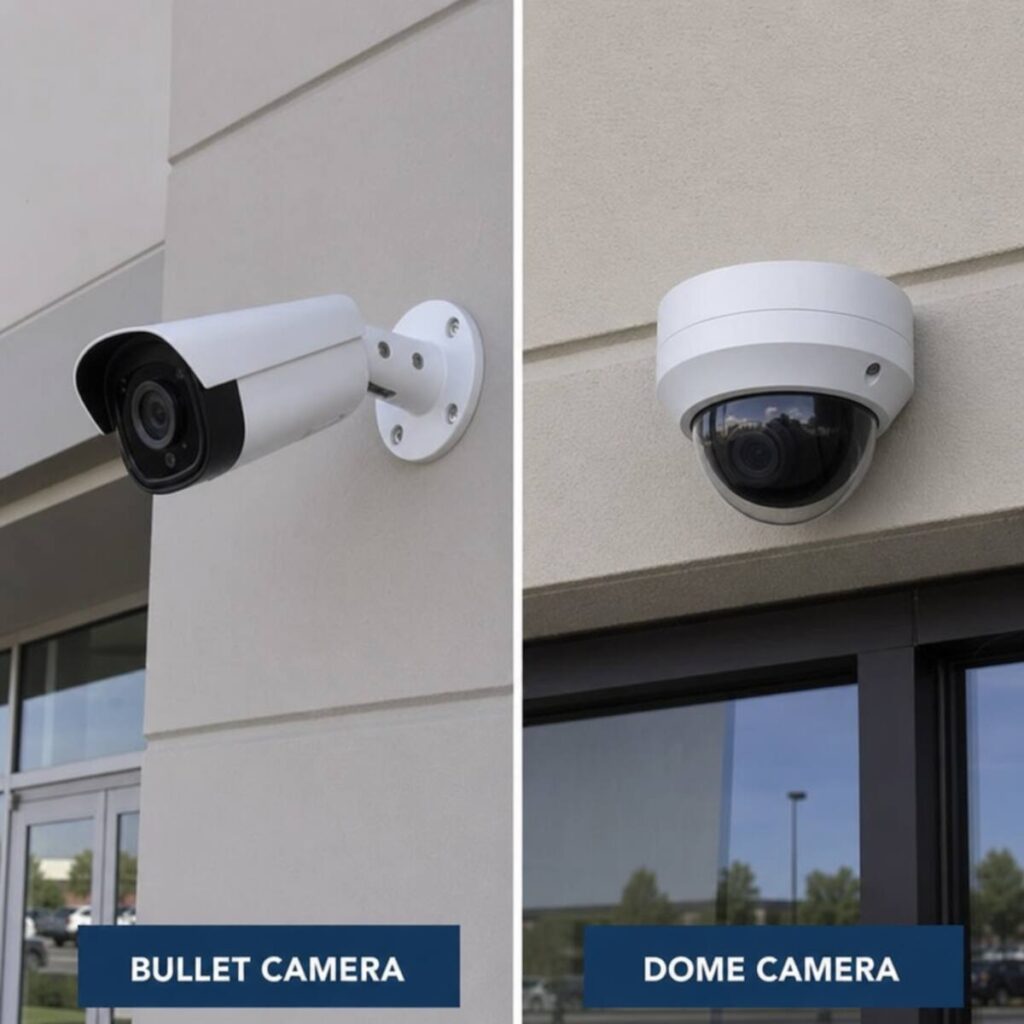
When securing your business perimeter, the two most popular camera shapes are dome and bullet. Understanding the nuances of dome vs bullet cameras for exterior use is critical for maximizing your system’s effectiveness.
Bullet Cameras:
- Design: Cylindrical and highly visible, pointing out like the barrel of a gun.
- Best For: Long-distance viewing (such as down the side of a large warehouse or along a long driveway).
- Pros: Highly visible (acts as a strong psychological deterrent), generally easier to install, and often feature larger lenses for longer-range infrared (IR) night vision.
- Cons: Susceptible to tampering (someone can physically push the camera with a broom handle to change its viewing angle) and spider webs often obscure the lens.
Dome Cameras:
- Design: Circular, dome-shaped housing that mounts flush against a ceiling or wall.
- Best For: Areas where aesthetics matter, low-hanging ceilings, and high-vandalism areas.
- Pros: Highly vandal-resistant (especially IK10-rated models), difficult for intruders to tell exactly which way the camera lens is pointing, and highly aesthetic.
- Cons: The glass dome can attract dust and water spots over time, requiring occasional cleaning to maintain image clarity.
Pan-Tilt-Zoom (PTZ) Cameras
For expansive areas like car dealerships, large parking lots, or active construction sites, PTZ cameras offer incredible flexibility. These cameras can be controlled remotely to pan across a scene, tilt up and down, and optically zoom in on a license plate or a face hundreds of feet away without losing resolution.
Fisheye and 360-Degree Cameras
Ideal for the center of retail showrooms or open-plan office spaces, a single fisheye camera can replace three or four traditional cameras by providing a comprehensive, panoramic view of an entire room.
3. High-Definition IP Camera Resolution Guide
When an incident occurs, grainy, pixelated footage is practically useless. Today’s commercial systems rely on IP (Internet Protocol) cameras that offer massive leaps in image clarity compared to older analog systems.
However, buying the highest resolution available isn’t always the smart choice. Higher resolutions demand more storage space and more network bandwidth. Use this high-definition IP camera resolution guide to match the right lens to the right location:
- 2 Megapixel (1080p): The baseline standard. 1080p is perfectly adequate for small indoor rooms, general oversight of office spaces, and tight hallways where subjects will naturally be close to the lens.
- 4 Megapixel (1440p / 2K): The “sweet spot” for most commercial CCTV installations. 4MP offers double the detail of 1080p without overwhelming your storage drives. It is ideal for retail floors, warehouse aisles, and capturing facial details at a moderate distance (15 to 30 feet).
- 8 Megapixel (4K): The ultra-high-definition choice. 4K cameras should be deployed strategically where intense detail is required over wide areas. Use them for parking lots, loading docks, and license plate capture.
Pro Tip: Pay attention to a metric called Pixels Per Foot (PPF). To positively identify a stranger’s face in a court of law, you generally need about 40 to 60 PPF at the target distance. Security professionals use PPF calculators to ensure the camera’s resolution and focal length match the distance to the target area.
4. The Backbone of Your System: Infrastructure and Cabling
A modern commercial CCTV installation is only as reliable as the network it runs on. The days of running separate power cables and coaxial video cables to every single camera are largely over.
The Power Over Ethernet Infrastructure
The gold standard for modern security camera systems is the Power over Ethernet infrastructure (PoE).
PoE allows a single Ethernet cable (typically Cat5e or Cat6) to transmit both high-speed network data and electrical power to the camera simultaneously. This innovation drastically reduces installation time and material costs.
Benefits of PoE Infrastructure:
- Flexibility: You can place cameras anywhere you can run a network cable, without worrying about proximity to standard electrical outlets.
- Centralized Power Backup: By plugging your main PoE network switch into an Uninterruptible Power Supply (UPS), your entire camera system will stay online and record during a building-wide power outage.
- Scalability: Adding a new camera is as simple as running one more Ethernet cable from the network switch to the new camera location.
When designing your network, ensure your switches have an adequate PoE “power budget.” Standard cameras use regular PoE (15W), but heavy-duty outdoor PTZ cameras with heaters and blowers may require PoE+ (30W) or even PoE++ (60W).
5. Storing Your Evidence: On-Premise vs. Cloud Solutions
Once your cameras capture high-definition footage, that data needs to go somewhere. The storage architecture you choose will impact your system’s speed, security, and monthly operating expenses.
NVR vs DVR for Office Security
If you are deciding on a physical recording box for your IT closet, you will encounter two acronyms: DVR (Digital Video Recorder) and NVR (Network Video Recorder).
When evaluating NVR vs DVR for office security, the choice is clear for modern businesses:
- DVRs are legacy technology. They are used with older analog cameras. The video is processed at the recorder, requiring heavy, specialized coaxial cables.
- NVRs are built for modern IP cameras. With an NVR, the camera itself processes the video data and sends it over your local area network (LAN) to the recorder. NVR systems offer higher resolutions, intelligent AI analytics, and vastly superior scalability. For any new commercial installation, an NVR is the absolute minimum standard.
Cloud-Based vs On-Premise Video Storage
The biggest debate in modern business video surveillance is where the primary data should live.
On-Premise Storage (Using an NVR/Server):
- How it works: All footage is saved locally on hard disk drives inside a machine located in your building.
- Pros: No ongoing monthly storage subscription fees. You have complete physical control over your data. High-resolution continuous recording doesn’t clog your business’s internet bandwidth.
- Cons: If the building catches fire, or a burglar steals the NVR box, your footage is gone forever. Requires local maintenance of hard drives.
Cloud-Based Storage:
- How it works: Cameras stream their footage securely over the internet to remote servers (such as AWS or proprietary camera-vendor clouds).
- Pros: Ultimate data redundancy—even if the physical camera is smashed, the footage is safely stored off-site. Excellent for managing multiple business locations from a single dashboard. Minimal on-site hardware to maintain.
- Cons: Requires strong, consistent upload bandwidth. Often comes with a per-camera monthly subscription fee that can become expensive for large camera counts.
The Hybrid Approach: Many modern businesses opt for a hybrid solution. High-definition footage is stored locally on an on-premises NVR for fast playback, while crucial low-resolution substreams or motion-triggered event clips are backed up to the cloud. This offers the best of both worlds: bandwidth efficiency and disaster recovery.
How Long to Store Business Security Footage
A critical question during the system design phase is: how long to store business security footage?
Storage duration directly dictates how many terabytes (TB) of hard drive space you need to purchase.
- The Industry Standard: 30 days is the most common retention period for general commercial businesses. It provides enough time to realize an incident occurred (such as missing inventory discovered during a monthly audit) and review the tape.
- High-Risk Environments: Banks, casinos, and cannabis dispensaries are often mandated by strict local regulations to hold footage for 90 days or even a full year.
- Maximizing Storage: To save drive space, many businesses set cameras in low-traffic areas (like emergency stairwells) to “Motion Record Only,” while high-liability areas (like cash registers) are set to “Continuous 24/7 Recording.”
6. Surveillance Strategies for Specific Commercial Environments
A system designed for a quiet accounting firm will fail miserably in a massive logistics facility. Your commercial CCTV installation must be tailored to the unique operational challenges of your industry.
Retail: Fixing Blind Spots and Stopping Shrink
Retail environments face dual threats: external shoplifting and internal employee theft. To combat this, businesses must employ intelligent loss prevention surveillance strategies.
- Fixing Blind Spots in Retail Stores: Shoplifters look for dead zones—high aisles or corners not covered by cameras. To fix this, utilize a mix of overhead 360-degree fisheye cameras to get a macro view of the floor, complemented by specialized narrow-lens bullet cameras looking directly down high-value aisles (like cosmetics or electronics). Always place a public view monitor (PVM) right at the entrance. When customers see themselves on a screen as they walk in, it acts as a massive psychological deterrent.
- Point of Sale (POS) Integration: Modern security camera systems can integrate directly with your cash registers. As an employee rings up an item, the receipt text is overlaid onto the video footage. This is a vital loss prevention strategy to catch “sweet-hearting” (where a cashier pretends to scan a $100 item but actually scans a $1 barcode hidden in their hand for a friend).
Warehouses and Industrial Spaces
Industrial spaces are vast, poorly lit, and full of moving machinery.
- How Many Cameras Does a Warehouse Need? There is no magic number, but there is a formula. Instead of trying to monitor every square inch of empty floor space, focus on operational choke points. You need dedicated cameras on:
- Every loading dock door (capturing truck numbers and cargo loading).
- All man-doors (employee entrances).
- The staging/shipping area (where packages are sealed).
- Forklift charging stations (for liability and fire safety).
- High-value cages. For a standard 50,000 sq ft warehouse, a strategic setup usually requires between 16 to 25 cameras, provided they are placed intelligently. Do not waste cameras looking at the tops of inventory racks; position them to look down the aisles.
Corporate Offices: Security vs. Privacy
In an office setting, the goal is protecting intellectual property and employee safety without creating an oppressive “Big Brother” environment. Cameras should be focused on lobbies, IT server rooms, and building perimeters, while keeping out of breakrooms and personal workspaces to maintain employee morale.
7. The Power of Modern Software: AI, Analytics, and Remote Access
The hardware is only half the equation. The software that manages your business security camera system setup turns passive video into proactive security intelligence.
Remote Monitoring Mobile App Integration
Business owners can’t be everywhere at once. Seamless remote monitoring mobile app integration is a non-negotiable feature for modern setups. Whether you are at home, on a business trip, or on the golf course, you should be able to open an app on your smartphone and instantly view live feeds, playback recorded video, and receive critical push notifications.
Artificial Intelligence and Video Analytics
Older security systems relied on basic “pixel-change” motion detection, which meant every time a tree blew in the wind or a shadow moved, you received a false alarm.
Today’s systems utilize advanced AI and deep learning. Features include:
- Human/Vehicle Classification: The camera ignores dogs, shadows, and weather, alerting you only if a human or vehicle crosses a defined perimeter line after hours.
- Loitering Detection: If someone lingers near the back loading dock for more than two minutes, the system alerts security.
- Heat Mapping: For retail stores, cameras can track customer foot traffic, showing store managers which end-caps and product displays receive the most attention.
- License Plate Recognition (LPR): Specialized cameras can read, log, and search license plates, automatically opening a gate for employee vehicles while alerting security if a blacklisted vehicle enters the lot.
8. Advanced Security Ecosystems: Tying It All Together
A truly robust commercial security posture doesn’t rely on cameras in a vacuum. Video surveillance should be one pillar of a unified security ecosystem.
Integrating Access Control with Video Surveillance
One of the most powerful upgrades a business can make is integrating access control with video surveillance.
Access control systems (keycards, fobs, or biometric scanners used to unlock doors) are great, but they have a flaw: card sharing. If Employee A gives their swipe card to an unauthorized person, the access control log simply shows that “Employee A” entered the building at 2:00 AM.
By integrating the two systems, every time a door is badged, a video bookmark is automatically created. Security managers can run an access control report, click the 2:00 AM entry log, and instantly pull up the video clip of that exact door. If the face on the video doesn’t match the ID badge used, you immediately know there has been a security breach.
9. Navigating Legalities and Compliance
Installing cameras in a commercial environment isn’t just a technical challenge; it is a legal one. Failing to adhere to local and federal laws can result in severe fines and lawsuits.
Business Video Surveillance Privacy Laws
Before mounting cameras, you must thoroughly understand business video surveillance privacy laws applicable to your region (such as GDPR in Europe, CCPA in California, and general federal workplace laws in the US).
Key Legal Considerations:
- Reasonable Expectation of Privacy: You absolutely cannot place cameras in areas where employees or customers have a reasonable expectation of privacy. This includes restrooms, locker rooms, changing booths, and designated lactation rooms. Doing so is a severe criminal offense.
- Audio Recording is a Minefield: In video surveillance, recording video is generally widely accepted. Recording audio is heavily regulated. Many states and countries have strict “Two-Party Consent” wiretapping laws. If your cameras record audio in a public space where conversations can be overheard, you may be breaking the law. Most professional installers disable audio recording on commercial systems by default to protect the business owner from liability.
- Signage and Notification: In many jurisdictions, you are legally required to post clear, visible signage stating that video surveillance is in use on the premises. Even if not legally mandated, posting signs is a best practice—it serves as an excellent deterrent.
- Protecting Stored Footage: If your cameras capture sensitive data (such as a computer screen displaying patient medical records or customer credit card information), your video footage must be heavily encrypted and password-protected to comply with HIPAA or PCI DSS regulations.
10. Budgeting: Understanding the Total Cost of Ownership
A common mistake business owners make is viewing a commercial CCTV installation purely as a one-time capital expenditure. To budget properly, you must understand the Total Cost of Ownership (TCO).
Upfront Capital Costs
- Hardware: Cameras, NVR/Servers, PoE switches, and monitors.
- Cabling and Materials: Spools of Cat6 cable, conduit, J-hooks, and mounting brackets.
- Labor: Professional security camera installation labor is often the largest line item on the quote. Running wire through complex commercial ceilings, terminating connections, aiming lenses, and configuring network software takes highly skilled time.
Commercial Surveillance System Maintenance Costs
Once the system is live, it requires ongoing care. Budgeting for commercial surveillance system maintenance costs ensures your system doesn’t degrade over time.
- Software Licensing: If you are using enterprise-level Video Management Software (VMS) or cloud storage, you will have annual recurring licensing fees.
- Physical Maintenance: Outdoor cameras need their lenses cleaned of dust and bug debris at least twice a year.
- IT Maintenance: Firmware updates must be applied to cameras and recorders to patch cybersecurity vulnerabilities. Hard drives, which spin 24/7, typically have a lifespan of 3 to 5 years and will eventually need to be replaced.
- System Audits: Budget for a security integrator to visit once a year to ensure cameras haven’t been bumped out of alignment, verify retention times are still accurate, and test backup batteries.
11. Finding the Right Partner for Your Security Camera Installation
While DIY wireless camera kits might suffice for a small home, a commercial CCTV installation requires professional expertise. You are dealing with complex networking, fire codes (such as the use of plenum-rated cable in HVAC drop ceilings), and life-safety liabilities.
When searching for an integration partner to handle your business security camera system setup, look for the following:
- Proper Licensing and Insurance: Ensure the company holds the required low-voltage electrical licenses and any specific security licenses required by your state or municipality.
- IT Proficiency: Today’s cameras are essentially specialized network computers. Your installer must have a deep understanding of IP networking, subnet masks, VLANs, and cybersecurity best practices to ensure your camera network doesn’t become a backdoor for hackers to access your business data.
- Post-Installation Support: Ask about Service Level Agreements (SLAs). If your system goes down on a Friday night, will they send a technician on Saturday, or will you have to wait until Tuesday afternoon?
- A Focus on Strategy, Not Just Gadgets: The best installers won’t just ask “How many cameras do you want?” They will ask, “What are your security pain points?” and design a custom solution tailored to your specific operational needs.
12. Future-Proofing Your Investment
The security industry is moving at lightning speed. As you finalize your system, keep an eye on future scalability. Ensure your NVR or cloud plan can handle additional cameras as your business grows. Opt for open-standard protocols (like ONVIF compliance) so you aren’t permanently locked into a single camera manufacturer.
By investing in high-quality PoE infrastructure today, you ensure that upgrading to 8K cameras or more advanced AI modules in five years will require only swapping out the camera head, rather than rewiring your entire building.
13. Conclusion: Securing Your Business for Tomorrow
Executing a flawless commercial CCTV installation is one of the most critical investments you can make in the longevity and profitability of your business. It protects your bottom line from shrinkage, shields you from frivolous liability claims, and provides peace of mind that your facility and personnel are safe.
By conducting a thorough professional security site survey, understanding the technical nuances of your hardware—from resolution to PoE infrastructure—and selecting the right storage and software integrations, you transform a simple camera system into an invaluable business intelligence tool.
Don’t wait for a costly incident to force your hand. Take a proactive approach to your business security camera system setup today. Partner with a certified professional, respect the legal nuances of video surveillance, and build a customized, scalable system that will watch over your enterprise for years to come.
